LARAVEL USING CRUD
Steps:
1)switch our project then run the server using this-> cmd then php
artsian serve
2) /resource/views/your viewfile name
save as filname.blade.php
3)go to Routes page app/http/routes.php open the file and then routes
the viewpage
Route::get('your parameter to view page user defined', function () {
return view('your view file
name ');
});
(or)
Create Controller File using this cmd php artisan make:controller your
controller name --resource
open your controller file index() method to implement
public function index(){
return view('your view file name');
}
then open your routes page
Route::get('your parameter to view page user defined','your cotroller
name@your method');
EX:
Route::get('signup','firstcontroller@index');
then submit your form Throw the
Exception TokenMismatchException
go to your view file
<form method="post" action="">
{{ csrf_field() }} ---> put this code after form tag
then submit your values are show
go to your controller store method
public function store(Request $req){
return $req->all(); ----> it will display all
(or)
return $req->your specify name();
ex:
return $req->name; -----> it will display only name
}
then go to your .env file to configure
DB_DATABASE=your database name
DB_USERNAME=your username
DB_PASSWORD=your password
Create Model
php artisan make:model model name -m
then go to your APP/database/migration your modelname table
public function up()
{
Schema::create('your table name is alredy
defined ', function (Blueprint $table) {
$table->your datatype('your
column name')
$table->your datatype('your
column name')
$table->your datatype('your
column name')
$table->your datatype('your
column name')
});
}
then migrate your table
php artisan migrate
check your database your tables is created or not
go to your model file
put this code
$fillable=['Your posted values name','Your posted values name','Your
posted values name'];
ex:
$data=['reg','name','mak'];
then go to your controller file store method
put the import your model
ex:
use App\your modelname;
write coding for insert database
public function store(Request $req){
create object for your model
public function store(Request $req)
{
$test=new yourmodelname;
$test->regno=$req->regno;
$test->name=$req->name;
$test->mark=$req->mark;
if($test->save()){return
redirect()->back();}else{}
}
}
then run your file check the database data are insert or not
// Display Your Record
go to your controller file
put this code
public function index()
{
$samename['samename']=yourmodelname::all();--->it will display all
records in array format
return view('your view
file',$samename);
}
next go your view file
<TABLE border='1' cellpadding='8'>
<tr><th>Regno</th><th>Name</th><th>Mark</th><th>Delete</th></tr>
@foreach($samename as $row)
<tr>
<td>{{ $row['regno'] }}</td>
<td>{{ $row['name'] }}</td>
<td>{{ $row['mark'] }}</td>
<td><a href="/register/{{ $row['id']
}}">delete</a></td>
</tr>
@endforeach
</TABLE><br>
//delete
go controller file delete method
public function delete($id)
{
$del=your
model name::find($id);
$del->delete();
return
redirect()->back();
}
//Update The record
go to Route File
Route::get('yourview file name/{pass parameter ex id
}','controllername@function name');
Route::post('view name','controllername@function name');
Coding:
Route.php:
<?php
Route::get('/', function () {
return view('welcome');
});
Route::get('first','firstcontroller@index');
Route::post('first','firstcontroller@store');
Route::get('crud','crudctrl@index');
Route::post('crud','crudctrl@store');
Route::get('update/{id}','crudctrl@show');
Route::post('upd','crudctrl@update');
Route::get('crud/{id}','crudctrl@delete');
Route::get('login','crudctrl@loginpage');
Route::post('login','crudctrl@login');
View File :
<html>
<head>
<title>CRUD Operation Using Laravel</title>
<link rel="stylesheet" type="text/css" href="{{ ('css/bootstrap.min.css') }}">
</head>
<body>
<div class="container">
<div class="row">
<div class="col-md-3">
</div>
<div class="col-md-5 login-sec">
<h2 class="text-center">Signup</h2>
<form method="post" action="">
{{ csrf_field() }}
<div class="form-group">
<label for="exampleInputEmail1" class="text-uppercase">First Name</label>
<input type="text" class="form-control" name="fname" placeholder="" >
<label for="exampleInputEmail1" class="text-uppercase">Last Name</label>
<input type="text" class="form-control" name="lname" placeholder="" >
</div>
<div class="form-group">
<label class="text-uppercase">Email</label>
<input type="text" name="email" class="form-control">
</div>
<div class="form-group">
<label class="text-uppercase">Uname</label>
<input type="text" name="uname" class="form-control">
</div>
<div class="form-group">
<label class="text-uppercase">Password</label>
<input type="password" class="form-control" name="pwd">
</div>
<center><input type="submit" value="Insert" class="btn btn-success"></center>
</form>
</div>
</div>
<table class='table table-responsive'>
<tr class='info'><th>Fname</th><th>Lname</th><th>Email</th><th>Uname</th><th>Password</th><th>Update</th><th>Delete</th></tr>
@foreach($records as $row)
<tr>
<td>{{ $row['fname'] }}</td>
<td>{{ $row['lname'] }}</td>
<td>{{ $row['email'] }}</td>
<td>{{ $row['uname'] }}</td>
<td>{{ $row['pwd'] }}</td>
<td><a href="/update/{{ $row['id'] }}"><button class='btn btn-warning'>Update</button></a></td>
<td><a href="/crud/{{ $row['id'] }}"><button class='btn btn-danger'>Delete</button></a></td>
</tr>
@endforeach
</table>
<center> {{ $rows->links() }}
</center>
</div>
</body>
</html>
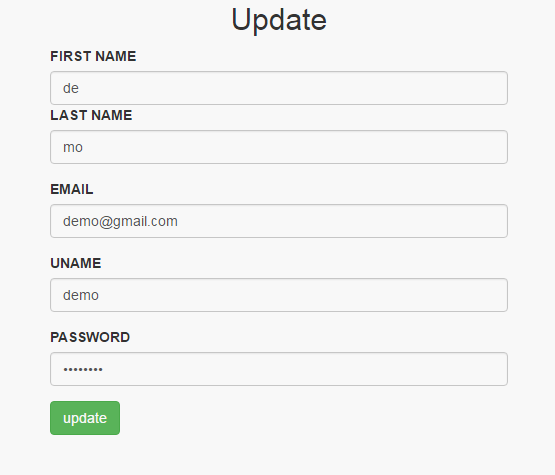
Update view file:
<html>
<head>
<link rel="stylesheet" type="text/css" href="{{ asset('css/bootstrap.min.css') }}">
</head>
<body>
<div class="container">
<div class="row">
<div class="col-md-5 login-sec">
<h2 class="text-center">Update</h2>
<form method="post" action="/upd">
{{ csrf_field() }}
<input type="hidden" value="{{$sow['id'] }}" name="id">
<div class="form-group">
<label for="exampleInputEmail1" class="text-uppercase">First Name</label>
<input type="text" value="{{$sow['fname'] }}" class="form-control" name="fname" placeholder="" >
<label for="exampleInputEmail1" class="text-uppercase">Last Name</label>
<input type="text" value="{{$sow['lname'] }}" class="form-control" name="lname" placeholder="" >
</div>
<div class="form-group">
<label class="text-uppercase">Email</label>
<input type="text" value="{{$sow['email'] }}" name="email" class="form-control">
</div>
<div class="form-group">
<label class="text-uppercase">Uname</label>
<input type="text" value="{{$sow['uname'] }}" name="uname" class="form-control">
</div>
<div class="form-group">
<label class="text-uppercase">Password</label>
<input type="password" value="{{$sow['pwd'] }}" class="form-control" name="pwd">
</div>
<input type="submit" value="update" class="btn btn-success">
</form>
</div>
</div>
</div>
</body>
</html>
Model file:
<?php
namespace App;
use Illuminate\Database\Eloquent\Model;
class crudopn extends Model
{
protected $datas=['fname','lname','email','uname','pwd'];
}
Controller file:
<?php
namespace App\Http\Controllers;
use Illuminate\Http\Request;
use App\Http\Requests;
use App\crudopn;
use DB;
class crudctrl extends Controller
{
/**
* Display a listing of the resource.
*
* @return \Illuminate\Http\Response
*/
public function index()
{
$records['records']=crudopn::all();
return view('crudopr',$records);
}
/**
* Show the form for creating a new resource.
*
* @return \Illuminate\Http\Response
*/
public function loginpage()
{
return view('login');
}
/**
* Store a newly created resource in storage.
*
* @param \Illuminate\Http\Request $request
* @return \Illuminate\Http\Response
*/
public function store(Request $request)
{
$inst=new crudopn;
$inst->fname=$request->fname;
$inst->lname=$request->lname;
$inst->email=$request->email;
$inst->uname=$request->uname;
$inst->pwd=$request->pwd;
if($inst->save()){return redirect()->back();}else{}
}
/**
* Display the specified resource.
*
* @param int $id
* @return \Illuminate\Http\Response
*/
public function show($id)
{
$sow['sow']=crudopn::find($id);
return view('update',$sow);
}
/**
* Show the form for editing the specified resource.
*
* @param int $id
* @return \Illuminate\Http\Response
*/
public function login(Request $req)
{
$uname=$req->input('uname');
$passwd=$req->input('passwd');
$login=DB::table('crudopns')->where(['uname'=>$uname,'pwd'=>$passwd])->get();
$cnt=count($login);
if($cnt==1){
echo "<script>window.location.href='http://localhost:8000/crud';</script>";
}else{
echo "<script>alert('Your Username or Password is Wrong');window.location='http://localhost:8000/login';</script>";
}
}
/**
* Update the specified resource in storage.
*
* @param \Illuminate\Http\Request $request
* @param int $id
* @return \Illuminate\Http\Response
*/
public function update(Request $req)
{
//$up=crudopn::find($req->id);
$updates=crudopn::find($req->id);
$updates->fname=$req->fname;
$updates->lname=$req->lname;
$updates->email=$req->email;
$updates->uname=$req->uname;
$updates->pwd=$req->pwd;
if($updates->save()){echo "<script>window.location.href='http://localhost:8000/crud';</script>";}else{}
}
/**
* Remove the specified resource from storage.
*
* @param int $id
* @return \Illuminate\Http\Response
*/
public function delete($id)
{
$del=crudopn::find($id);
$del->delete();
return redirect()->back();
}
}
Outputs: